
Documentation
Bind jqxChart to MySQL Database Using Spring MVC

In this help topic you will learn how to bind a jqxChart to a MySQL database using the Spring Web MVC framework, which provides model-view-controller architecture and ready components that can be used to develop flexible and loosely coupled web applications. The MVC pattern results in separating the different aspects of the application (input logic, business logic, and UI logic), while providing a loose coupling between these elements.
1. Set Up a Database
Our goal is to populate a jqxChart from a MySQL database. In the example presented here, we will be using the Northwind database. To learn how to set it up, please follow Step 1 from the help topic Configure MySQL, Eclipse and Tomcat for Use with jQWidgets.
2. Create a New Project in Eclipse
In this tutorial, we will be using Eclipse IDE for Java EE Developers, version Luna.
- Go to File → New → Maven Project.
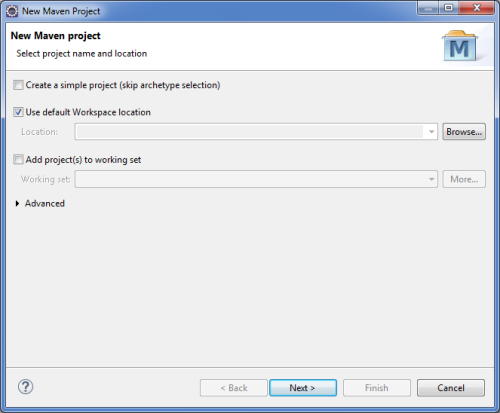
- In the New Maven Project window, make sure Create a simple
project (skip archetype selection) is unchecked and click Next.
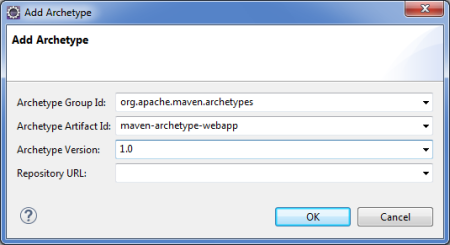
- In the next window, click Add Archetype... and set Archetype
Group Id to org.apache.maven.archetypes, Archetype Artifact
Id to maven-archetype-webapp and Archetype Version
to 1.0. Then click OK.
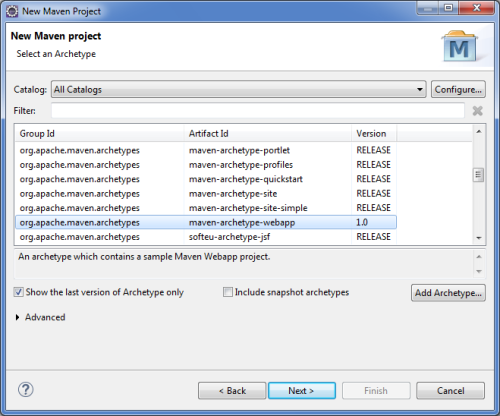
- Select the newly added archetype and click Next.
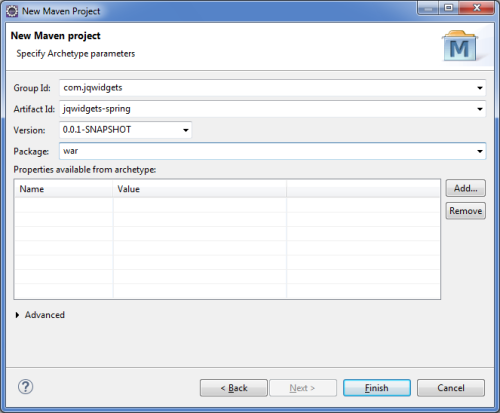
- In the final window of the new project setup, set the Group Id
to com.jqwidgets, the Artifact Id to jqwidgets-spring
and the Package to war. Finally, click Finish.
3. Configure the Project
Add the necessary project dependencies in the file pom.xml in the root
of the project:
<project xmlns="http://maven.apache.org/POM/4.0.0" xmlns:xsi="http://www.w3.org/2001/XMLSchema-instance" xsi:schemalocation="http://maven.apache.org/POM/4.0.0 http://maven.apache.org/maven-v4_0_0.xsd"> <modelVersion>4.0.0</modelVersion> <groupId>com.jqwidgets</groupId> <artifactId>jqwidgets-spring</artifactId> <packaging>war</packaging> <version>0.0.1-SNAPSHOT</version> <name>jqwidgets-spring Maven Webapp</name> <url>http://maven.apache.org</url> <dependencies> <dependency> <groupId>junit</groupId> <artifactId>junit</artifactId> <version>3.8.1</version> <scope>test</scope> </dependency> <dependency> <groupId>org.springframework</groupId> <artifactId>spring-core</artifactId> <version>${spring.version}</version> </dependency> <dependency> <groupId>org.springframework</groupId> <artifactId>spring-webmvc</artifactId> <version>${spring.version}</version> </dependency> <dependency> <groupId>org.codehaus.jackson</groupId> <artifactId>jackson-core-lgpl</artifactId> <version>1.9.9</version> </dependency> <dependency> <groupId>org.codehaus.jackson</groupId> <artifactId>jackson-mapper-lgpl</artifactId> <version>1.9.9</version> </dependency> </dependencies> <build> <finalName>jqwidgets-spring</finalName> </build> <properties> <spring.version>4.0.2.RELEASE</spring.version> </properties></project>
The file web.xml, found in src\main\webapp\WEB-INF, defines
everything about the application that the server needs to know. Configure it as
follows:
<?xml version="1.0" encoding="UTF-8" ?><web-app xmlns:xsi="http://www.w3.org/2001/XMLSchema-instance" xmlns="http://java.sun.com/xml/ns/javaee" xmlns:web="http://java.sun.com/xml/ns/javaee/web-app_2_5.xsd" xsi:schemalocation="http://java.sun.com/xml/ns/javaee http://java.sun.com/xml/ns/javaee/web-app_3_0.xsd" id="WebApp_ID" version="3.0"> <display-name>Archetype Created Web Application</display-name> <servlet> <servlet-name>mvc-dispatcher</servlet-name> <servlet-class> org.springframework.web.servlet.DispatcherServlet </servlet-class> <load-on-startup>1</load-on-startup> </servlet> <servlet-mapping> <servlet-name>mvc-dispatcher</servlet-name> <url-pattern>/</url-pattern> </servlet-mapping></web-app>
The <servlet> element declares the DispatcherServlet. When the DispatcherServlet
is initialized, the framework will try to load the application context from a file
named [servlet-name]-servlet.xml located in the WEB-INF
directory. The <servlet-mapping> element specifies what URLs will be handled
by the DispatcherServlet.
The DispatcherServlet has to be created. Do so by right-clicking the WEB-INF
folder and selecting New → Other. Choose XML
File and name the file mvc-dispatcher-servlet.xml. Add
the following as its content:
<beans xmlns="http://www.springframework.org/schema/beans" xmlns:context="http://www.springframework.org/schema/context" xmlns:mvc="http://www.springframework.org/schema/mvc" xmlns:xsi="http://www.w3.org/2001/XMLSchema-instance" xsi:schemalocation=" http://www.springframework.org/schema/beans http://www.springframework.org/schema/beans/spring-beans-3.0.xsd http://www.springframework.org/schema/context http://www.springframework.org/schema/context/spring-context-3.0.xsd http://www.springframework.org/schema/mvc http://www.springframework.org/schema/mvc/spring-mvc-3.0.xsd"> <context:component-scan base-package="com.jqwidgets" /> <bean class="org.springframework.web.servlet.view.InternalResourceViewResolver"> <property name="prefix"> <value>/WEB-INF/</value> </property> <property name="suffix"> <value>.jsp</value> </property> </bean> <mvc:resources mapping="/resources/**" location="/resources/" /> <mvc:annotation-driven /></beans>
4. Create the Model
We are going to populate a jqxChart with information about products from the products table in the Northwind database. That is why we need a Model class which describes a product and its properties.
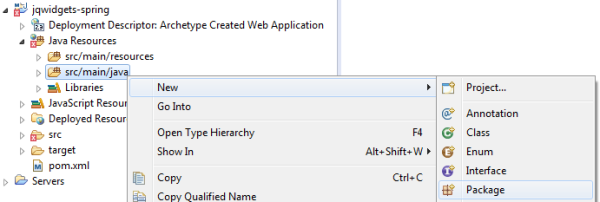
First, right-click Java Resources and create a new Source Folder.
Set jqwidgets-spring as its Project name and src/main/java
as its Folder name. Next, create a new package in the folder named
com.jqwidgets:
In the new package, create our Model class, Product. This class describes
a product with its name and units in stock with the following code:
package com.jqwidgets;public class Product { private String productName; private String unitsInStock; public String getProductName() { return productName; } public void setProductName(String productName) { this.productName = productName; } public String getUnitsInStock() { return unitsInStock; } public void setUnitsInStock(String unitsInStock) { this.unitsInStock = unitsInStock; }}5. Create the Controller
The Controller is where the DispatcherServlet will delegate requests. It will retrieve
product data from the database and store it in instances of the Product
class. Create a new class, ChartController in the package com.jqwidgets
with the following content:
package com.jqwidgets;//Spring Frameworkimport org.springframework.stereotype.Controller;import org.springframework.ui.ModelMap;import org.springframework.web.bind.annotation.RequestMapping;import org.springframework.web.bind.annotation.RequestMethod;import org.springframework.web.bind.annotation.ResponseBody;//JDBCimport java.sql.*;//List and ArrayListimport java.util.List;import java.util.ArrayList;@Controller@RequestMapping("/chart")public class ChartController { @RequestMapping(method = RequestMethod.GET) public String chart(ModelMap model) { return "chart"; } @RequestMapping(value = "/getProducts", method = RequestMethod.POST) public @ResponseBody List<Product> getProducts() { List<Product> productList = new ArrayList<Product>(); try { // database connection // "jdbc:mysql://localhost:3306/northwind" - the database url of the form jdbc:subprotocol:subname // "root" - the database user on whose behalf the connection is being made // "abcd" - the user's password Connection dbConnection = DriverManager.getConnection( "jdbc:mysql://localhost:3306/northwind", "root", "abcd"); // retrieve necessary records from database Statement getFromDb = dbConnection.createStatement(); ResultSet products = getFromDb .executeQuery("SELECT ProductName, UnitsInStock FROM products WHERE CategoryID=1"); // populate an ArrayList with the retrieved data while (products.next()) { productList.add(new Product(products.getString("ProductName"), products.getString("UnitsInStock"))); } } catch (SQLException e) { e.printStackTrace(); } return productList; }}
6. Add the Necessary jQWidgets Scripts and Stylesheets to the Project
Create a resources folder in src\main\webapp and in it
add two more folders - js and css. Include in them all
(or only the necessary) jQWidgets files - the scripts (including jqxcore.js
and the specific widget files) in js and the stylesheets (jqx.base.css
and any themes and associated images) in css. Remember to include a
version of jQuery in js, too.
7. Create the View (JSP)
The View is where the jqxChart with the product data will be displayed. Create a
new JSP File in src\main\webapp\WEB-INF and name it
chart.jsp. This page will serve as the View. Here is its content:
<%@ page language="java" contentType="text/html; charset=ISO-8859-1" pageEncoding="ISO-8859-1"%><%@ taglib prefix="c" uri="http://java.sun.com/jsp/jstl/core"%><!DOCTYPE html><html lang="en"><head> <title>This example shows jqxChart binding to MySQL using Spring Web MVC.</title> <link type="text/css" rel="Stylesheet" href="css/jqx.base.css" /> <style type="text/css"> .labels { font-size: smaller; } </style> <script type="text/javascript" src="<c:url value="/resources/js/jquery.js" />"></script> <script type="text/javascript" src="<c:url value="/resources/js/jqxcore.js" />"></script> <script type="text/javascript" src="<c:url value="/resources/js/jqxdata.js" />"></script> <script type="text/javascript" src="<c:url value="/resources/js/jqxdraw.js" />"></script> <script type="text/javascript" src="<c:url value="/resources/js/jqxchart.core.js" />"></script> <script type="text/javascript"> $(document).ready( function () { var source = { datatype: "json", datafields: [{ name: 'productName', type: 'string' }, { name: 'unitsInStock', type: 'int' }], url: '${pageContext.request.contextPath}/chart/getProducts', type: 'POST', async: true }; var dataAdapter = new $.jqx.dataAdapter(source); var settings = { title: "Availability of Products", description: "in Category 1", padding: { left: 5, top: 5, right: 15, bottom: 5 }, titlePadding: { left: 90, top: 0, right: 0, bottom: 10 }, source: dataAdapter, xAxis: { dataField: 'productName', displayText: 'Product Name', gridLines: { visible: true }, valuesOnTicks: false, type: 'basic', labels: { class: 'labels', angle: 90, formatFunction: function (value) { return value.replace(/\?/g, ''); } }, flip: false }, colorScheme: 'scheme01', seriesGroups: [{ type: 'column', columnsGapPercent: 30, seriesGapPercent: 0, orientation: 'horizontal', valueAxis: { minValue: 0, unitInterval: 10, description: 'Units in Stock', flip: true }, series: [{ dataField: 'unitsInStock', displayText: 'Units in Stock' }] }] }; $('#chartContainer').jqxChart(settings); }); </script><script async src="https://www.googletagmanager.com/gtag/js?id=G-2FX5PV9DNT"></script><script>window.dataLayer = window.dataLayer || [];function gtag(){dataLayer.push(arguments);}gtag('js', new Date());gtag('config', 'G-2FX5PV9DNT');</script></head><body> <div id='chartContainer' style="width: 860px; height: 600px; margin-bottom: 25px;"></div></body></html>
You will need to add the JSP Standard Tag Library to the project. Create a folder
named lib in src\main\webapp\WEB-INF and place the library's
JAR there. You can get it from this location: http://www.java2s.com/Code/Jar/j/Downloadjstl12jar.htm.
8. Run the Chart Page
Before running the View, please make sure you have the Apache Tomcat server installed and configured as explained in Steps 5 and 6 from the tutorial Configure MySQL, Eclipse and Tomcat for Use with jQWidgets.
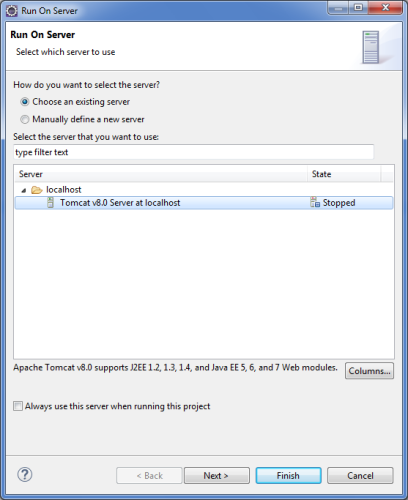
Right-click the project and select Run As → Run on Server. In the window that appears, select Tomcat v8.0 Server at localhost and click Finish.
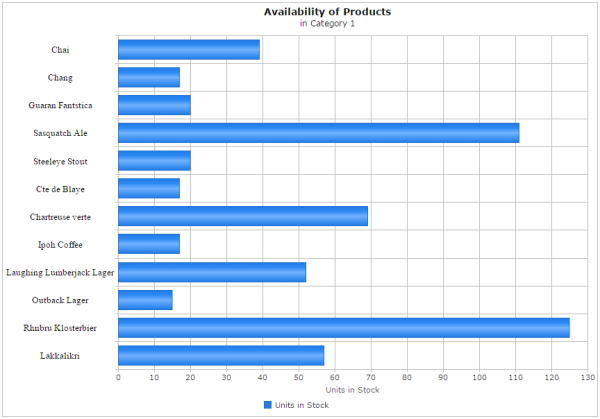
Go to http://localhost:8080/jqwidgets-spring/chart to view the chart page:
You can download the project as a WAR file from here: jqwidgets-spring.zip.
