jQWidgets
  • Docs
  • License and Pricing
  • Services
  • Community
    • Forums
    • Blogs
    • Follow Us
    • Client Login
  • About
    • About Us
    • Contact Us
    • FAQ
  • Products
    • Angular
    • React
    • Vue
    • jQuery
    • Web Components
    • Blazor
    • Svelte
    • Templates
  • Download
Angular UI Components
  • Javascript/jQuery
  • Angular
  • Vue
  • React
  • Web Components
  • Blazor
  • Templates
  • Theme Builder
  • Artavolo
Show Demo List

Angular UI Components (Angular 16–22 supported)

Data Grids and Tables

  • jqxGrid
  • jqxPivotGrid
  • jqxTreeGrid
  • jqxDataTable

Charts and Visualization

  • jqxChart
  • jqxGauge
  • jqxBarGauge
  • jqxBulletChart
  • jqxHeatMap
  • jqxTreeMap
  • jqxRangeSelector
  • jqxBarcode New
  • jqxQRcode New
  • jqxDraw

Scheduling and Planning

  • jqxScheduler
  • jqxGantt
  • jqxKanban
  • jqxTimeline

AI and Collaboration

  • jqxChat New

Editors and Inputs

  • jqxEditor
  • jqxForm
  • jqxDateTimeInput
  • jqxCalendar
  • jqxTimePicker
  • jqxInput
  • jqxNumberInput
  • jqxMaskedInput
  • jqxFormattedInput
  • jqxComplexInput
  • jqxPasswordInput
  • jqxTextArea
  • jqxColorPicker
  • jqxSlider
  • jqxKnob
  • jqxRating
  • jqxButtons
  • jqxCheckBoxGroup New
  • jqxFileUpload
  • jqxValidator
  • jqxValidator

Lists and Selection

  • jqxDropDownList
  • jqxComboBox
  • jqxListBox
  • jqxTree
  • jqxPickList New

Navigation and Menus

  • jqxTabs
  • jqxMenu
  • jqxToolBar
  • jqxRibbon
  • jqxNavigationBar
  • jqxNavBar
  • jqxListMenu

Layout and Containers

  • jqxSplitter
  • jqxLayout
  • jqxDockingLayout
  • jqxDocking
  • jqxSplitLayout
  • jqxPanel
  • jqxExpander
  • jqxResponsivePanel
  • jqxScrollView
  • jqxScrollBar

Popups and Feedback

  • jqxWindow
  • jqxNotification
  • jqxTooltip
  • jqxPopOver
  • jqxLoader
  • jqxProgressBar

Data and Utilities

  • jqxDragDrop
  • jqxSortable

jqxPivotGrid

  • Pivot Grid Cell Values Alignment
  • Pivot Grid Custom Pivot Function
  • Pivot Grid Custom Rendering
  • Pivot Grid Designer
  • Pivot Grid Drill Through Cell
  • Pivot Grid Events
  • Pivot Grid Localization
  • Pivot Grid OLAP and Tree Style Rows
  • Pivot Grid Row, Columns and Cells Styling with CSS
  • Pivot Grid Totals
  • Pivot Grid with Values on Columns
  • Pivot Grid with Values on Rows
Theme:
  • Demo
  • App.htm
  • app.ts
  • app.html
  • main.ts
  • API Reference

Angular PivotGrid

Angular Pivot Grid

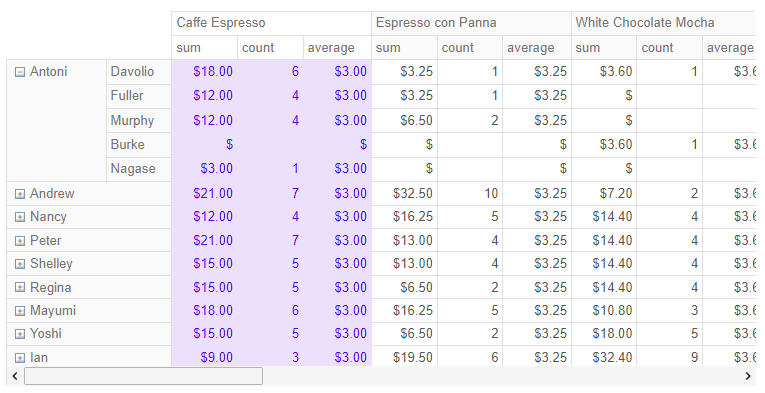
The Angular PivotGrid component is a lightweight and powerful data visualization component. It offers many advanced features and is highly customizable to different needs. jqxPivotGrid – angular pivot grid
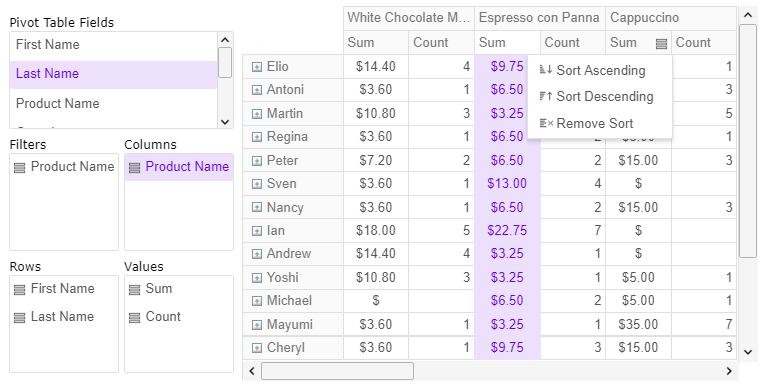
The angular pivot grid allows visualization of multi-dimensional data and hierarchical data structures. It supports multiple different aggregation functions and developers can also provide user-defined aggregations. The pivot grid for Angular also ships with a pivot table designer widget. The pivot table designer allows you to visually configure the pivot columns, rows, aggregated values and multiple different settings. You can also configure pivot rows and columns text alignment settings and various text formatting options on the pivot cells. The Angular pivot grid and the pivot designer also allow the user to configure pivot table filters both programmatically and visually using drag and drop operations and filter selection options. You can use the PivotGrid widget to add interactive pivot tables to your website, build custom dashboards, or use it in your mobile applications. The pivot grid widget offers excellent cross-browser compatibility and works well with both desktop and mobile browsers.

Basic concepts

Before you start with the Pivot Grid widget, you should be familiar with pivot tables and understand when to use regular data grids to display table data, and when to switch to the pivot grid and pivot tables. The following article is a good entry-level introduction to pivot tables: Wikipedia: Pivot tables

Generally the pivot grid will contain the following elements:
  • Pivot Rows - the unique values of the source columns which form the rows hierarchy.
  • Pivot Columns - the unique values of the source columns which form the rows hierarchy
  • Pivot Values - the aggregation function headers. They can be displayed below the columns or on the right side of the rows.
  • Pivot Cells - each pivot cell contains the aggregated value for the respective row, column and aggregation function.
jqxPivotGrid supports Compact and traditional OLAP style. The benefits of the compact style visualization are that it uses less space and you can see subtotals because. The rows that form the pivot table are rendered in a tree-like structure.

Compact style rendering
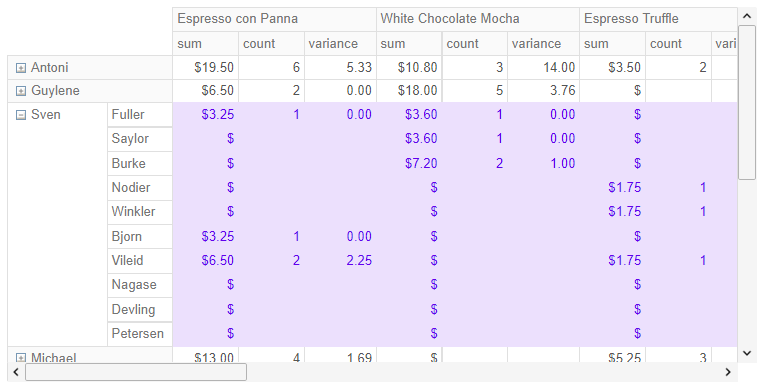
jqxPivotGrid – angular pivot grid tree style

OLAP style rendering
jqxPivotGrid – angular pivot grid olap style

With our pivot grid, you can conditionally format any cell. jqxPivotGrid – angular pivot grid conditional formatting
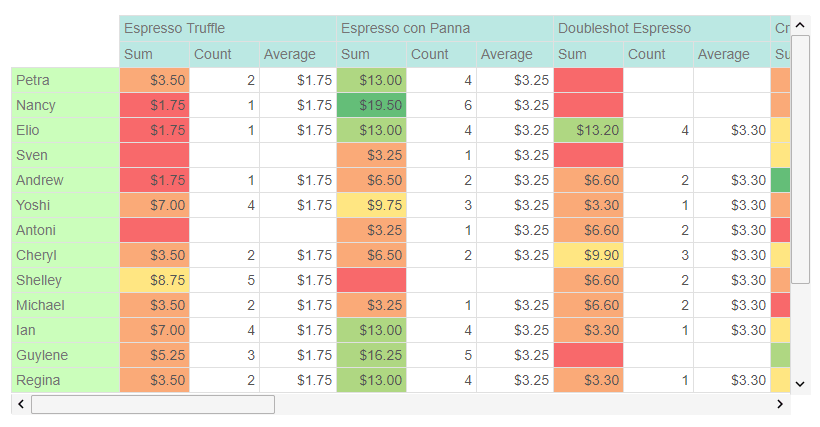
The Pivot Grid allows you to display summary fields in order to make quick comparisons
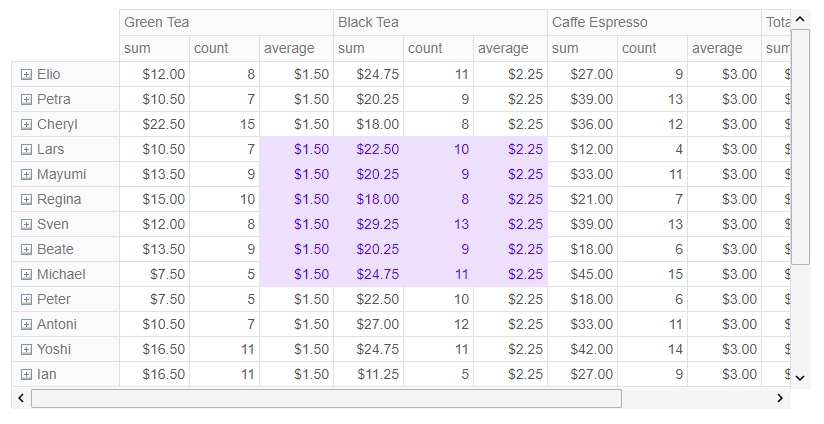
jqxPivotGrid – angular pivot grid totals
jQWidgets
  • Facebook
  • X (Twitter)
  • Demo
  • Download
  • Documentation
  • License and Pricing
  • Services
  • Products
  • Angular UI Components
  • React UI Components
  • Vue UI Components
  • Blazor UI Components
  • jQuery UI Components
  • Javascript UI Components
  • Svelte Data Grid (SvGrid)
  • Forums
  • About
  • Terms of Use
  • Privacy Policy
  • Contact Us

jQWidgets © 2011-2026. All Rights Reserved.