
jQWidgets
  • Docs
  • License and Pricing
  • Services
  • Community
    • Forums
    • Blogs
    • Follow Us
    • Client Login
  • About
    • About Us
    • Contact Us
    • FAQ
  • Products
    • Angular
    • React
    • Vue
    • jQuery
    • Web Components
    • Blazor
    • Svelte
    • Templates
  • Download
Angular UI Components
  • Javascript/jQuery
  • Angular
  • Vue
  • React
  • Web Components
  • Blazor
  • Templates
  • Theme Builder
  • Artavolo
Show Demo List

Angular UI Components (Angular 16–22 supported)

Data Grids and Tables

  • jqxGrid
  • jqxPivotGrid
  • jqxTreeGrid
  • jqxDataTable

Charts and Visualization

  • jqxChart
  • jqxGauge
  • jqxBarGauge
  • jqxBulletChart
  • jqxHeatMap
  • jqxTreeMap
  • jqxRangeSelector
  • jqxBarcode New
  • jqxQRcode New
  • jqxDraw

Scheduling and Planning

  • jqxScheduler
  • jqxGantt
  • jqxKanban
  • jqxTimeline

AI and Collaboration

  • jqxChat New

Editors and Inputs

  • jqxEditor
  • jqxForm
  • jqxDateTimeInput
  • jqxCalendar
  • jqxTimePicker
  • jqxInput
  • jqxNumberInput
  • jqxMaskedInput
  • jqxFormattedInput
  • jqxComplexInput
  • jqxPasswordInput
  • jqxTextArea
  • jqxColorPicker
  • jqxSlider
  • jqxKnob
  • jqxRating
  • jqxButtons
  • jqxCheckBoxGroup New
  • jqxFileUpload
  • jqxValidator
  • jqxValidator

Lists and Selection

  • jqxDropDownList
  • jqxComboBox
  • jqxListBox
  • jqxTree
  • jqxPickList New

Navigation and Menus

  • jqxTabs
  • jqxMenu
  • jqxToolBar
  • jqxRibbon
  • jqxNavigationBar
  • jqxNavBar
  • jqxListMenu

Layout and Containers

  • jqxSplitter
  • jqxLayout
  • jqxDockingLayout
  • jqxDocking
  • jqxSplitLayout
  • jqxPanel
  • jqxExpander
  • jqxResponsivePanel
  • jqxScrollView
  • jqxScrollBar

Popups and Feedback

  • jqxWindow
  • jqxNotification
  • jqxTooltip
  • jqxPopOver
  • jqxLoader
  • jqxProgressBar

Data and Utilities

  • jqxDragDrop
  • jqxSortable

jqxInput

  • Default Functionality
  • Multiple Values
  • Binding to JSON Data
  • Input Group
  • Fluid Size
  • Right to Left Layout
  • Two Way Data Binding
Theme:
  • Demo
  • App.htm
  • app.ts
  • app.html
  • main.ts
  • API Reference

Angular Input UI Component

The Input component for Angular is very similar to the TextArea component and provides suggestions while you type into the input field. The component can be bound to JSON data and can enable auto-complete and multiple values. With multiple values you can type something then select a value and then continue typing another value.
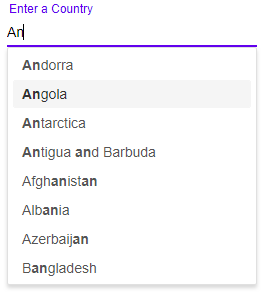
angular input

About jqxInput for Angular

jqxInput is the jQWidgets Input component for Angular. Text input with auto-complete from a local or remote data source.

7 jqxInput demos with source code

  • Default Functionality – The default functionalities of Angular Input.
  • Multiple Values – Angular Input's autocompleting multiple values into one field.
  • Binding to JSON Data – Angular Input bound to JSON data.
  • Input Group – Angular Input with a button at the end of the input field.
  • Fluid Size – The width and height of the Angular Input are set in percentages.
  • Right to Left Layout – Angular Input's right to left support.
  • Two Way Data Binding – Angular Input's two way data binding.

jqxInput API

jqxInput has 21 properties, 4 events and 4 methods, all in the API reference. Its main members, those its demos use first:

  • placeHolder (property) – Sets or gets the input's place holder.
  • minLength (property) – Sets or gets the minimum character length needed before triggering auto-complete suggestions.
  • val (method) – Sets or gets the value.
  • query (property) – Determines the input's query.
  • renderer (property) – Enables you to update the input's value, after a selection from the auto-complete popup.
  • displayMember (property) – Sets or gets the displayMember of the Items.
  • valueMember (property) – Sets or gets the valueMember of the Items.
  • select (event) – This event is triggered when an item is selected from the auto-suggest popup.
  • items (property) – Sets or gets the maximum number of items to display in the popup menu.
  • aiKey (property) – Determines the input's Chat GPT AI Key.

Learn more

  • Getting started
  • API reference
  • JavaScript version
jQWidgets
  • Facebook
  • X (Twitter)
  • Demo
  • Download
  • Documentation
  • License and Pricing
  • Services
  • Products
  • Angular UI Components
  • React UI Components
  • Vue UI Components
  • Blazor UI Components
  • jQuery UI Components
  • Javascript UI Components
  • Svelte Data Grid (SvGrid)
  • Forums
  • About
  • Terms of Use
  • Privacy Policy
  • Contact Us

jQWidgets © 2011-2026. All Rights Reserved.